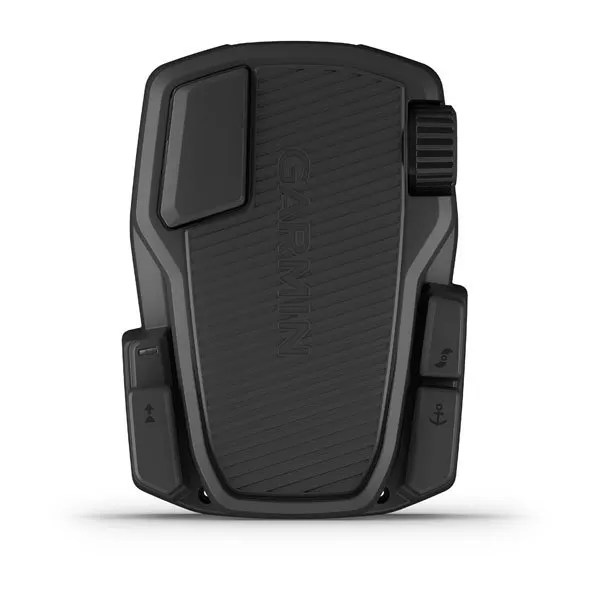
Garmin | Force Trolling Motor Foot Pedal
Enjoy the convenience of a wireless foot pedal for the Force™ trolling motor. It provides instant control and responsiveness, yet feels and steers just like a cable-steered pedal. It operates wirelessly using AA batteries, or — if you prefer — it can be hardwire installed.
Foot Pedal
You can use the foot pedal to operate the trolling motor.
|
|
Momentary propeller control |
Hold to turn on the propeller at the set speed. Release to turn off the propeller. |
|---|---|---|
|
|
Speed wheel |
Rotate the wheel away from you to increase the propeller speed or cruise control speed. Rotate the wheel toward you to decrease the propeller speed or cruise control speed.
NOTE: The speed wheel is inactive when anchor lock is on.
|
|
|
Steering pedal |
Push the pedal with your toes to turn the motor clockwise. Push the pedal with your heel to turn the motor counter-clockwise.
NOTE: When anchor lock or heading hold is on, or you are following a route, press the pedal to resume manual control at the previous propeller speed.
|
|
|
Status LED |
Shows the status of the foot pedal (Status Indicator). |
|
|
Continuous propeller control |
Press to turn the propeller on and off (Turning the Propeller On and Off). |
|
|
Heading hold |
Press to set and maintain the current heading (Maintaining Your Heading). Press to turn off heading hold, stop the propeller, and resume manual control.
TIP: You can disable this function if you prefer (Disabling the Heading Hold Function on the Foot Pedal).
|
|
|
Anchor lock |
Press to turn on anchor lock. Anchor lock uses the trolling motor to hold your position (Holding Your Position). Press to turn off anchor lock and return to the previous steering mode. |


Original: $285.13
-65%$285.13
$99.80Garmin | Force Trolling Motor Foot Pedal
Enjoy the convenience of a wireless foot pedal for the Force™ trolling motor. It provides instant control and responsiveness, yet feels and steers just like a cable-steered pedal. It operates wirelessly using AA batteries, or — if you prefer — it can be hardwire installed.
Foot Pedal
You can use the foot pedal to operate the trolling motor.
|
|
Momentary propeller control |
Hold to turn on the propeller at the set speed. Release to turn off the propeller. |
|---|---|---|
|
|
Speed wheel |
Rotate the wheel away from you to increase the propeller speed or cruise control speed. Rotate the wheel toward you to decrease the propeller speed or cruise control speed.
NOTE: The speed wheel is inactive when anchor lock is on.
|
|
|
Steering pedal |
Push the pedal with your toes to turn the motor clockwise. Push the pedal with your heel to turn the motor counter-clockwise.
NOTE: When anchor lock or heading hold is on, or you are following a route, press the pedal to resume manual control at the previous propeller speed.
|
|
|
Status LED |
Shows the status of the foot pedal (Status Indicator). |
|
|
Continuous propeller control |
Press to turn the propeller on and off (Turning the Propeller On and Off). |
|
|
Heading hold |
Press to set and maintain the current heading (Maintaining Your Heading). Press to turn off heading hold, stop the propeller, and resume manual control.
TIP: You can disable this function if you prefer (Disabling the Heading Hold Function on the Foot Pedal).
|
|
|
Anchor lock |
Press to turn on anchor lock. Anchor lock uses the trolling motor to hold your position (Holding Your Position). Press to turn off anchor lock and return to the previous steering mode. |
Product Information
Product Information
Shipping & Returns
Shipping & Returns
Description
Enjoy the convenience of a wireless foot pedal for the Force™ trolling motor. It provides instant control and responsiveness, yet feels and steers just like a cable-steered pedal. It operates wirelessly using AA batteries, or — if you prefer — it can be hardwire installed.
Foot Pedal
You can use the foot pedal to operate the trolling motor.
|
|
Momentary propeller control |
Hold to turn on the propeller at the set speed. Release to turn off the propeller. |
|---|---|---|
|
|
Speed wheel |
Rotate the wheel away from you to increase the propeller speed or cruise control speed. Rotate the wheel toward you to decrease the propeller speed or cruise control speed.
NOTE: The speed wheel is inactive when anchor lock is on.
|
|
|
Steering pedal |
Push the pedal with your toes to turn the motor clockwise. Push the pedal with your heel to turn the motor counter-clockwise.
NOTE: When anchor lock or heading hold is on, or you are following a route, press the pedal to resume manual control at the previous propeller speed.
|
|
|
Status LED |
Shows the status of the foot pedal (Status Indicator). |
|
|
Continuous propeller control |
Press to turn the propeller on and off (Turning the Propeller On and Off). |
|
|
Heading hold |
Press to set and maintain the current heading (Maintaining Your Heading). Press to turn off heading hold, stop the propeller, and resume manual control.
TIP: You can disable this function if you prefer (Disabling the Heading Hold Function on the Foot Pedal).
|
|
|
Anchor lock |
Press to turn on anchor lock. Anchor lock uses the trolling motor to hold your position (Holding Your Position). Press to turn off anchor lock and return to the previous steering mode. |